Sunday, March 25, 2012

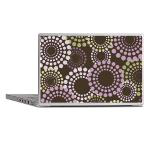
My Newest Design -- Abstract Circles


Fun abstract circles made of dots in purple, green and white on a chocolate background created in faux cross-stitch, all on quality products provided by CafePress.

As pictured left -- Scribble important stuff - lyrics, recipes, addresses, and more. Our Wire-O bound, 160 page journal has your choice of papers and measures 5" x 8", a handy on-the-go size to fit in your backpack. Get creative and let the muse flow.
  • Back cover made of thin black flexible textured plastic, measures 16/1000" thick
  • Front cover made of 12pt glossy paper, laminated for durability
  • Filled with your choice of 60lb bookweight (24 lb bond) paper -- blank, dot grid, lined college-ruled, or a task journal.

Your feedback would be lovely and thank you for taking the time. By the way, if you like to cross-stitch and want the pattern to make a pillow cover for yourself, a pdf pattern is available for you in both my Etsy and eCrater shops.


Saturday, March 24, 2012

Update Your Blogger Background Using Multiple Background Images & CSS


There are so many really well designed and cute Blogger templates available. Most are one graphic with a decorative border or borders and solid center where blog content and the sidebar are visible and are uploaded to a service like PhotoBucket or Picasa. These work well in some instances but I recently had to buy a newer computer which has a slightly different sized screen than my previous one.

When I looked at my blog, the only way the background worked was to reduce the size of the text so small that with my eyesight it became impossible to read comfortably.

Researching how to solve this problem and keep an attractive background led me to CSS (cascading style sheets) styling which allows placement of multiple background images. There are quite a few articles written about this on the web searchable through Google.

For the lay person (like me), I thought I would share how I broke down my blog background into three images and placed them within the xml coding. I use the minima 2-column template.

This was how my previous one-piece background coding looked:

body {
  background:$bgcolor;
  url(http://i604.photobucket.com/albums/tt127/dpeagreendesigns/BlogBackground.jpg);
  margin:0;
  color:$textcolor;
  font: x-small Georgia Serif;
  font-size/* */:/**/small;
  font-size: /**/small;
  text-align: center;
  }

I broke my column graphics off into two separate images keeping them approximately 200 pixels or less wide and 685 pixels long. I created the center background from what was left though one could probably use a small seamless tile and add those directions to the CSS. I uploaded these three graphics to my free Comcast personal web page and then coded as follows:

body {
   background: url("http://home.comcast.net/~dpeagreendesigns/LHBorder.png") top left no-repeat, url("http://home.comcast.net/~dpeagreendesigns/RHBorder.png") top right no-repeat, url("http://home.comcast.net/~dpeagreendesigns/CenterBkgrd.png") center top no-repeat;
  background-attachment: fixed;
  margin:0;
  color:$textcolor;
  font: x-small Georgia Serif;
  font-size/* */:/**/small;
  font-size: /**/small;
  text-align: center;
  }

The highlighted coding provides the border and background graphics on this page. It is important to remember the last image (url) is the one which will be at the bottom of the layers. If you look at my background here and compare it to the coding above, I think it will help to make sense of how this multiple background layering can work for a blog.

If you decide to play around with this, I encourage you to use a "test blog". In any event, please make sure you save the existing html template you are using so that if frustration sets in, you can copy and paste the original html coding back into your template. 

There is more information available at the w3Schools website as well as at W3C.org.

I am still working on the cross-browser issues this coding has with Internet Explorer but it works beautifully with Firefox. I did use BrowserShots which allows you to view screenshots of a page in many different browsers and those that won't translate the CSS merely have a white background so content can be read. 

More on this as I learn . . .


Friday, March 23, 2012

Newest CafePress Design -- Hot Pink & Black Damask

Newest CafePress Design! Hot Pink and Black Damask. Wild yet elegant.


If you prefer to create your own needlework, the pattern for this design is available at both Etsy and eCrater.


Friday, August 5, 2011

My Newest Toy -- The Amazon Kindle

I purchased the Kindle 3G/Wireless Special Offers e-reader a week ago. I love it!! I rarely spend money on toys. Why, I don't know, but this toy is on its way to being a necessity!

The weight is indeed lighter than most paperback books. The print is crisp, clear and easy to read even in bright light. I will eventually purchase a book light for reading in the evening when I don't feel like turning on all the lamps in the room. Font size is so easy to change and I believe it can be made large enough for even those who close to legally blind.

I've purchase two books from Amazon written by one of my favorite contemporary authors, John Gresham, and enjoying reading every word of the first. There are also free books available if one is looking to download a classic or the Bible.

Recent news releases from both Amazon and local libraries and their associations bring additional great news for those on a budget or who prefer to borrow from a library. Later this year, the Kindle will roll out access through Overdrive.

When I was deciding which e-book reader to purchase, I did look at the Nook. It is in color, has a touch screen and is library borrowing ready. I found the black and white screen Kindle with no touch screen to be lighter and to have enough features that I needed more to my liking.

In addition to the readability of the screen, ease of use, and light weight, I just love that the Kindle 3G/Wireless has free internet access. There is a browser which can be accessed from the main/experimental menus and as long as there is 3G, I can surf the web, check my various email accounts, as well as order and download books.

I'm one of those people who love to read and listen to music at the same time. The Kindle 3G/Wireless provides plenty of space for my favorite mp3s under the same main/experimental menu as the browser. The Kindle comes with a plug that separates and gives me USB access to my computer to download my music. It also charges the battery while connected to a computer. It has speakers but my earphones work even better. I didn't purchase earphones. I used the ones from my mp3 player.

In order to find these gems, I had to read up on the Kindle before purchasing. When I visited stores to compare e-book readers, it seems none of the personnel were aware that internet browsing and music were available on the Kindle.

When I purchased my Kindle, I charged it up. I haven't had to charge it again since and I've been reading and listening to music every day. In fact, the battery indicator is still showing over half charged even with the wireless access on. I do, however, power it down when I am not using it rather than allow the screensaver to run.

The cost of the Kindle will end up minimal over a very short time. The money I save on purchasing e-books rather than paperback or hard cover will add up quickly. In addition, I won't have to purge my book storage. I love keeping my books but live in a space less than 800 square feet so do not have the room to keep too many at a time.

The value of being able to order any book I want to read and then adjust the text to be comfortable for my aging eyes outweighs the cost already. While large print books are available, not everything I want to read is available in large print on paper.

If you love to read and are finding yourself doing so less and less because of the strain on your eyes trying to read what seems to be finer and finer print, don't be afraid to try the Kindle.

I love the smell of a paper bound book. I love the feel. I love turning pages. All this is lost with an e-book reader but the enjoyment of being able to comfortably read text in a font large enough I don't have to squint or stop reading every few minutes to give my eyes a rest outweighs the loss.

After all, I can still walk through a book store or a library and pick up a book, smell it and turn the pages. Then I can sit down or take a walk, sit in the sun and read from my Kindle while listening to my favorite tunes.


Design your own products at CafePress.com!

Share: